Build Innovation Into Your Team with New Technologies

English: Mission: STS-41-B Film Type: 70mm Tit...

English: Mission: STS-41-B Film Type: 70mm Title: Views of the extravehicular activity during STS 41-B Astronaut Bruce McCandless II, mission specialist, participates in a extra-vehicular activity (EVA), a few meters away from the cabin of the shuttle Challenger. He is using a nitrogen-propelled hand-controlled manned maneuvering unit (MMU). He is performing this EVA without being tethered to the shuttle. The picture shows a cloud view of the earth in the background. (Photo credit: Wikipedia)

I’m always on the lookout for new technology. Not in terms of expensive big-time technology, but everyday little solutions that make my life, and job, easier. Somewhere along the line, though, I realized that I couldn’t test out every piece of technology myself. I enjoy finding new technologies and sharing them with my team, but it just wasn’t sustainable.

That’s when I realized that I could lead my team in finding the best and most useful technologies on the market.

Perhaps you feel the same way. Finding a great piece of technology can really improve your efficiency, but going through the work to find that technology can take forever. For example, I use the easel.ly online infographic tool a lot. It allows me to create clean images or infographics in about half an hour. But do you know how many technologies I had to test drive to find the one that I liked the most? Quite a few.

Once you learn to lead your team in finding these technologies, though, you no longer need to test drive multiple technologies. You can simply ask people on your team what works best. Or (even better) they’ll pass along the technology to you before you even get a chance to ask.

Here’s how to do it.

Share New Technology with Your Team
Make it a point to share a new piece of technology once a week. When you do this, explain how to use the technology and what makes it so important. For example, imagine you found a simple program that allows you to take notes on your computer, but that also syncs those notes to your phone. Teach your team how to use it and explain how you’ve found it useful.

Invite Your Team to Share Technology with You
Let your team know that you’re always searching for the most effective technology on the market. Encourage them to bring new technology to you. You could even set up a submission system and share the technology you like the best in your once-a-week meeting.

Create a Public Forum for Team Members to Share Technology
I suggest creating a chat room that all your employees can use during the day (using any IM services already on the market). Encourage employees to share technologies with each other. Not only will you get to hear about new technologies, but those technologies will also pass a “peer review.” Any technology submitted into the chat room will likely be tested by various employees, giving you a well-rounded view of its effectiveness.

Why is This Important?
Innovation displays itself in many forms, including the way you operate within your business and the technologies you use to do that. When you encourage employees to continually search for the best, and to adapt accordingly, that attitude bleeds over into other areas of their work. If you do this long enough it will become part of your brand. You’ll become known as a leading organization in your field.

Second, you never know what you’re missing. There are too many technologies out there for you to know them all yourself. There could be a much more efficient way of accomplishing your task, and you just don’t know it. Enlisting your employees to seek out better technology increases your chances you’ll actually find it.

This approach gives you the chance of discovering something very useful without investing much time it in. Why not try it today? You might be surprised at what you find.

Enhanced by Zemanta

How Your Online Brand Can Be Hijacked Overnight And What To Do About It

Let me ask you a question. What do you think, is the cornerstone your brand online? Website design, Your voice, Your product quality and all the other things we talk about here? Well yes, they are of course important and play a part in the make up of your brand but the foundation of all online brands is…
The Domain Name

Photo credit: Sameer Vasta, via Flickr. Some rights reserved.

How credible can Amazon be when every aspect of your marketing from web site to emails and communications said “Amazon” but their web site domain name is “Amazonian.com”? The answer is none. Zero. Instead, they’d look like spammers or people out to steal identities.

It’s the same for small businesses with an online presence. Chances are, you took time choosing the right domain. You spent money and time developing the website, then there are business cards printed, ads run, articles or guest blog posts written that all lead back to your domain. Many of these things send you traffic over time and cannot be stopped even if you wanted it to. We all invest a lot in our web sites so imagine how you’d feel if your domain is hijacked from right under your nose.

It happens. In fact, domain theft is on the rise. There are a variety of ways this is done. The common story is, someone gains control of your domain administrator’s email address. This allows the thief to transfer the domain to their own account. When the transfer is complete, it is pretty much a done deal and a big hassle to get back – that’s if you’re lucky.

At that point, the thief can point the domain to their own web sites and steal everything. Your traffic, your good name, your online presence. It’s devastating.

What can you do about it

Be vigilant. Monitor your own domain names. You can get a free account over at domaintools.com and setup alerts to notify you whenever a change is detected with your domain. Remember, you may not get change notification emails from your own registrar if your email is hijacked so using a third party monitoring tool and having those alerts sent to an alternative address is a good idea.

Watch out for emails that disguise themselves as your registrar. It’s better to log in to your registrar directly instead of clicking links in those emails.

Consider private registration for your bread and butter domains.

Lock your domains. While this alone won’t do the trick when the admin account is compromised but it can help in other types of attempts.

Protect your email accounts. If you use Gmail, turn on two-factor authentication. Make sure you connect to your email accounts securely when using email clients like Outlook, Mail or Thunderbird. Change passwords regularly and it goes without saying, be sure the passwords are different from others and difficult to guess.

When you have a domain online that represents your brand, you have to get serious about this stuff. There’s too much riding on it not to.

Professionally Prepare Your Book For eReaders With Folium

Does it seem like everyone and their cat is publishing a Kindle book these days? Little wonder now that eReaders have gone main stream. People like it (I do, it’s the only way I read anymore) and the demand for content is huge. It’s not just because more people own it, I bet people who own and read using a Kindle, Nook, iPad or other readers are reading more than ever before. That’s what I’ve noticed about myself.

The technologies to create eBooks have also improved dramatically. Being a sucker for tools that help entrepreneurs in any which way, I jumped on the chance to review Folium Book Studio when they asked. Mind you, I don’t always review software just because someone asks. 99.9% of requests often go unanswered. Somehow, Folium sounded intriguing so I agreed.

What Is It?

Folium Book Studio labels itself as an eBook conversion and design tool. It will take your book and make it into an eBook format that Kindles, Nooks, iPads, Tablets etc can open.

How?

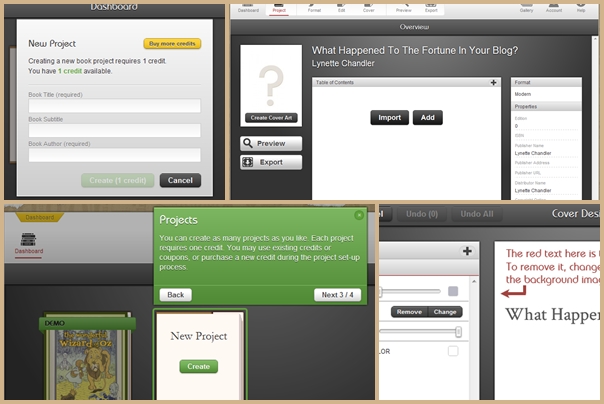
You start by creating a free account. Once in your account, you can familiarize yourself with the options using a sample book project that is automatically loaded into your account. You can’t export this book though but you can edit, remove, add, tweak, change the cover, design the cover, change styles and do just about anything to the sample book project so you can gain confidence using the tool.

Once you are ready to create your own eBook, you can start by creating a new project. Projects cost you 1 credit ($79) and you will have to pay up front for a credit before you can create a project.

When you have paid for a project, you begin by giving the project a title and some basic information. Next, you can upload your book. Folium accepts books in these formats:

  • Microsoft Word (.DOC or .DOCX)
  • HTML
  • Rich text format (.RTF)
  • Plain text (.TXT)

After the book is uploaded, Folium will attempt to clean up the formatting and detect where all your chapters, page headings and content are. It will present you with a quick snapshot of the headings and content. From there on you can edit the content in a nice, easy to use editor interface. You can also re-arrange your chapters easily by dragging and dropping them. At any time, you can also preview how the book will look like in an eReader.

When you are happy with the book and ready to publish, you simply click the Download button and Folium will generate a copy of your book in the necessary formats for Kindle and B&N. It’ll also automatically generate and assign an ISBN to your book.

You can return to download this book multiple times. Folium will save your book project for 1 year.

Likes

What I like most is the built in styles. One of my biggest challenges creating digital books is my lack of creativity when it comes to matching fonts and sizes. It sounds easy but it’s not. I’m not in the printing or publishing business but have worked in an ad agency. I know there are reasons behind certain fonts and sizes. So having pre-built styles that look like a regular book is fantastic. You can even add little glyphs or fleurons to your page for that nice finish.

Free ISBN. This I like. An ISBN is included in your project credit. It’s automatically created and attached to your book when you export. While getting an ISBN is not difficult – you can buy one online and have it immediately – but single ISBN’s cost $125 and a bundle of 10 cost $250. The price to create a project and have it properly formatted with ISBN with Folium is $79. I’d say that’s a deal.

Dis-Likes

Because I am only reviewing this product for a short time and haven’t actually created the book and put it up over at Amazon, iBooks or B&N, my experience is limited. At this time I can say the tool itself is a pleasure to work with and the price is right. The ability to push the book to these digital marketplaces would be nice.

Another thing, the ability to download the book without ISBN generation would also be welcome. This way, we can test how the book looks like by directly loading it into our own devices. As it is, I couldn’t verify the design and formatting on the Kindle or iPad. I’m sure it will look great but it would be nice to experience the book in a real device.

Disclaimer

We received a free credit worth $79 in exchange for an honest, unbiased review of Folium. Views favorable or not are a result of my experience with the product, not from the credit – although it was appreciated because it allowed me to dive deeper into the product.

Virtual Meetings on the Cloud

This is part of a series I am writing on virtual collaboration and fads for CEOs, small business owners, and entrepreneurs. It looks at best habits for virtual video-conferencing technology and the methods for keeping people interested using instruments from the cloud.

In this Vlog I talk to Phil Montero, president of Montero Consulting and originator of YouCanWorkFromAnywhere.com and TheAnywhereOffice.com. Phil’s avocation is collaborating with small to mid-sized business leaders in setting up the technology, training and tools for working virtually and leading online.

Virtual Trends

Phil sees the biggest trend in digital collaboration among CEOs as just that there is more of it, and it is a pattern that won’t be broken anytime soon. In many cases, online colleagues may collaborate for entire years and never meet face to face, yet still enjoy an effective business partnership.

Making the Choice for Technology

Virtual leadership prosperity hails from finding instruments that serve the sensible objective without getting in the way of people wanting to know, like and trust one another. That is still critical to people in any job atmosphere.

What gets you nearer that works continuously and shrinks the virtual distance between any virtual associates?

Cloud-based instruments such as Skype Video, Skype Screen share, Google docs and an array of mobile apps have lowered the cost of getting together from around the world. Moreover, the always expanding reach of Wi-Fi connections and hotspots has increased the value of mobile tools, and cloud application developers are trying to keep up.

Online Meeting Habits

Once the technology hurdle is mastered, not as effortless as you would imagine, today’s CEOs and Executives need to face the human aspects during online meetings. Attendees who are on the team with even the best intentions and determination will stray and start to multi-task throughout a monotonous session. To get and maintain max engagement, Phil recommends…

Short and Sweet

There is a fad in the physical meeting area to attempt to shorten meetings as a result of the huge time commitment required on the part of all attendants. Amplify that for online meetings. Want a 60 minute meeting? Break it into 3 20 minute meetings if feasible. It’s less convenient for you but more appealing for participants, and that means they are more useful after the meeting.

Prior Preparation

Send out an agenda in advance so people can prep, not just for their sections but to get their heads around what is going to be covered.

Keep Them on Their Toes

Call on people randomly to verify understanding. Just a few instances of being blind-sided will develop the aggregate consciousness of keeping involved to prevent the opportunity of broadcasting being unready and enduring the slings and arrows of your colleagues.

Tech Deadening

In a method I call Tech Deadening; the virtual technology decreases the enthusiasm of leader communication in reverse percentage to how far you are from the real thing. For example, video is the next best thing to being there, but it isn’t being there. Only teleconferencing? Your listeners are even further de-sensitized. Texting– you understand.

Leaders need to be aware of this and overemphasize tone of voice, gestures, expressions and their Knut Rockne speeches to connect.

Welcome to the Cloud

Your business needs to work everywhere. In this day and age of endless connection with others, it is becoming more imperative that businesses not be tied down to a physical business aspect that limits their capabilities. If you’re looking for more mobility, then welcome to the cloud.

Cloud computing is delivering host services all over the internet. So instead of hosting your software, servers or documents internally, they can instead be made readily available through the internet. Cloud based computing uses many different servers of its own across the internet, ensuring that your information is never in one single place and is secure. This safety feature also makes cloud computing possibly safer than having your own mainframe or using your own server in-house.

The Advantages of Cloud Technology

Those that work in the business world are constantly on the run. Who’s to say that your business can’t be just as effective from your local cafe than working in the office everyday. The ability to access your information from wherever your are with web based devices is certainly a nice tool to have in your back pocket- literally. The need to constantly remain seated in your office is less of a necessity. There is also no longer the need to keep constantly updating software. Cloud computers update software by themselves. So any software or information uploaded on a cloud server always has the most up-to-date, user friendly and convenient technology in use. This can drastically reduce the price of costs for information technology maintenance and software purchasing.

Grow your Business

Being advantageous of cloud technology allows you to focus on you. Use your time being innovative and growing your business, because cloud computing does the rest. It’s constantly checking your data to make sure it’s efficient, clean and effective. Yet it also give the satisfaction of knowing you are in control without the worry of security. Put your future, and your business, in the cloud.

Do you have some ideas of how you could use cloud technology to your business advantage? Have you used “the cloud” before?

Protecting Credit Card Information

Large companies have lost large amounts of money lately due to hacker activity. Sony suffered a hiccup when somebody infiltrated their PlayStation 3 database and got hold of their users’ credit card numbers. Sony repaired the error and gave customers 2 free games to download online. Citigroup was also a target for hacking attacks, but unlike Sony, company directors decided to withhold this information from consumers for 3 weeks.

In a world where online purchases are becoming the norm, security is key. You can offer your customers any perk you want, but nobody is going to spend their hard-earned money where strangers can come in and steal their credit card information. Merchants have several choices when it comes to payment applications, so it is always a good idea to go back to the SANS Institute’s list of validated payment applications.

In a PBS Frontline interview, Richard Power, Editorial Director of the Computer Security Institute, says that Visa International only recently came up with a set of guidelines for merchants to follow when doing online transactions. These new regulations focus on unloading more responsibility on the merchant when it comes to customer protection. By industry standards, saving data from credit cards’ magnetic stripes is not allowed.

These are the main steps to ensure customer data security.

  • No saving of sensitive data after the transaction has been authorized. This data includes card verification code, full magnetic stripe, and PIN block data.
  • Protecting cardholder data by masking PIN numbers and have software vendors inform customers of data purging processes.
  • Generation of strong cryptographic keys. Encrypting all information is vital to make it inaccessible to others. The cryptographic material used by previous versions of the payment application must be rendered irretrievable.
  • Provide secure authentication features, such as unique user IDs for each user, and authentication via password, secret question, biometric, or token or smart card.
  • To make passwords more effective, they should be at least 7 characters long, include numbers and letters, and should be changed every 90 days.
  • Limit repeated access attempts by locking out the account after a certain amount of login attempts. For added security, automatically log out users after they have been idle for 15 minutes.
  • Log payment application activity to keep track of transactions and make sure that there is no suspicious activity.
  • Never store cardholder data on a server that’s connected to the internet.

Much of the legislation dealing with Internet traffic and online transactions is still in the process of being created. User guidelines evolve together with the development of new technology. As new glitches are discovered, so are new fixes. By keeping up with the latest in credit card usage and payment applications, consumers and businesses can interact safely.

Small Business Project Management Software

Small business owners frequently believe that their particular industry or field is far too specialised to benefit from project management software. However, project management software can be enormously beneficial for small business, despite its perceived high cost. This is because the software, once properly configured, enables small business owners to quickly manage large quantities of data that would otherwise take significantly longer not only to process, but to frame in context.

As an example, any small business must invariably generate revenue statements detailing the progress in a particular quarter or year. By having project management software already in place, a slew of potentially difficult to find information is contained in one place. For a small manufacturing firm, the number of hours spent on a particular project or process is readily accessible, and often broken down by employee. Those employees who thrive at a particular task or process can be quickly identified; likewise, those who are not thriving in one area can be moved to another project where they can potentially contribute far more.

Departments that are chronically behind or understaffed also are much easier to evaluate with project management software than by using a traditional survey. This is because numbers convey factual data in a far more unsparing manner. Project managers frequently are consumed with the details of day to day operations, and are unable to provide more than a hastily arranged version of the overall progress of their department. Project management software provides answers when they are needed, in a form that is easily understood.

Although some forms of project management software can seem somewhat expensive, especially on the lean budget of a small business, they ultimately generate far more in profit and efficiency than the initial expenditure. This is because they can help a small business owner understand precisely what he is spending his money on. Overhead costs, profits, losses, and other forms of cash flow become immediately obvious when analyzed with the aid of software.

Additionally, project management software enables the automation of certain time-consuming tasks, such as the arrangement of meetings, the cataloguing of ideas, and other essential but occasionally tedious duties. Project managers are freed from having to micro-manage the progress of their particular task, and can instead focus on incorporating new procedures or innovative methods of motivating the workforce. Frequently, the difference between a successful, on-deadline project and a meandering, financially disastrous one is how effectively the project manager is able to guide his team. Shepherding a large project in a time-efficient manner requires a streamlined and clearly actionable process, which project management software can easily provide.

Additionally, project management software enables different levels of permission and access controls, which correspondingly allow employees to involve themselves in the project without compromising any levels of information privilege. This engenders a greater sense of participation, and correspondingly boosts enthusiasm across the board. In this way, project management software is a great aid to small business by forming a more integrated community and regulated exchange of information.

Resource:

IRIS Project Solutions has more info about project management software.